Class Cortex is the top TeachQuest alternative for teachers who want gamification with no student logins. Other options worth knowing include ClassMana for avatar-driven RPG progression, ClassDojo for simple behaviour points in primary, and Classroomscreen for a no-login widget board.
TeachQuest sits alongside Class Cortex in Google's AI Overview for ClassCraft alternatives - which means teachers searching for a ClassCraft replacement are frequently landing on both platforms at the same time and trying to work out which one fits their classroom better.
This guide gives you a direct, honest comparison. TeachQuest does some things genuinely well. It also has structural limitations that rule it out for a significant portion of the teachers who find it. Understanding exactly where those limits are will save you the time of setting something up only to discover it does not work in your school environment.
What Is TeachQuest?
TeachQuest is a deep classroom RPG platform built around an immersive fantasy world. Students create characters and progress through a layered game system that includes Raids, Solo Dungeons, Quests, Campaigns, Spells, Random Encounters, Pets, and Potions. It also includes a noise tracker, a student randomiser, and an Activity Center projector board with timer, task list, group maker, scoreboard and whiteboard widgets. The RPG depth is genuinely impressive - TeachQuest goes further than almost any other platform on building a persistent narrative world inside the classroom.
Students log in with codes or credentials managed by their teacher (an email is only needed if self-registration is switched on), and the system tracks individual progress, inventory, and character development across sessions, stored on TeachQuest's servers. This is the foundation its gamification sits on - and it is also the primary barrier for many schools.
What Is Class Cortex?
Class Cortex is a gamified classroom management tool built by a secondary school Digital Technology and STEM teacher with over fourteen years of K-12 experience. Rather than building a deep RPG narrative, Class Cortex combines a persistent XP and squad system with ten practical classroom tools - all running in a single browser tab with no student accounts required.
The ten tools cover timers (Arc and Detonator), a noise monitor, a student picker, a Quantum Core dice roller, a tactical scoreboard, a seating map, eight training mini-games, live Boss Battle multiplayer, a full whiteboard, and the Command Deck XP and squad system. For the full breakdown of how the XP system works in practice, see our guide on how to use XP in the classroom.
Where TeachQuest Wins
It is worth being direct about what TeachQuest does better, because the RPG depth is real and genuinely impressive for the right context.
- Narrative depth: Raids, dungeons, campaigns, spells, pets, and potions create a layered RPG world that Class Cortex does not attempt to match. If deep narrative immersion is the primary goal, TeachQuest is the stronger platform.
- Individual character progression: Because TeachQuest has student accounts, it can track individual character stats, inventory, and progression in ways that a no-account system cannot. Students have a persistent identity in the game world that evolves over a whole year.
- Random encounter mechanics: TeachQuest's Random Encounter system introduces unexpected in-game events that keep the classroom experience unpredictable in an engaging way.
- Projector display layer: Activity Center is a fullscreen projector board where you arrange timer, task list, group maker, scoreboard and whiteboard widgets, and the layout saves per classroom. It is a genuine strength for teachers who want one screen for the class to watch.
- Family and shop features: A parent dashboard, classroom shop, trading post and pet center extend the game beyond the classroom.
Where Class Cortex Wins
The four structural advantages of Class Cortex:
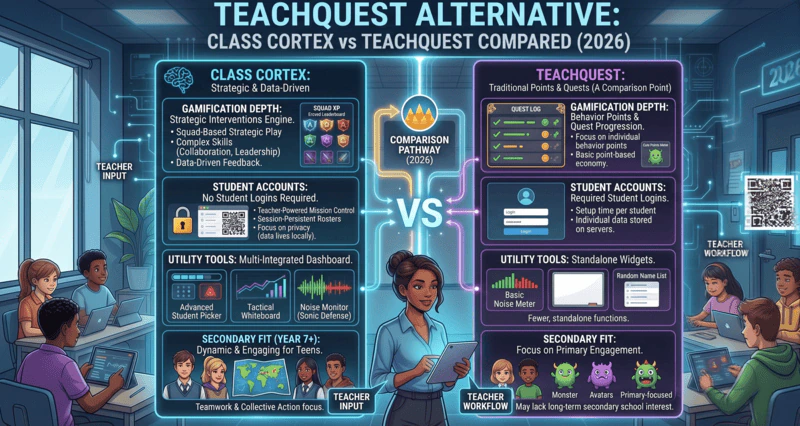
- No student accounts - ever: Class Cortex requires zero student account creation. The class roster lives in the teacher's browser localStorage. Students join Boss Battles at classcortex.com/join via QR code with no login, no profile, and no platform registration. For any school with strict COPPA, GDPR, or IT policies around student-facing platforms, this is a decisive advantage. TeachQuest's student logins and server-stored student data are not a minor friction point - in many schools they need IT or privacy sign-off.
- Tools TeachQuest does not have: TeachQuest has a noise tracker, a student randomiser and an Activity Center board with a basic whiteboard widget. Class Cortex adds the Sonic Defence Noise Monitor (calibrated to room baseline, visual alarm and Quiet Streak bonus XP free, automatic XP deduction on Pro hands-free mode), the Ordnance Seating Map (drag-and-drop, PDF export on Pro), a full Tactical Whiteboard with live class collaboration on Pro, a no-repeat Student Picker integrated with XP, Arc and Detonator timers, a Quantum Core dice roller, and eight Training Sim mini-games.
- Built for Australian classrooms: Class Cortex was built by an Australian teacher for Australian secondary year levels, and it works anywhere with no region-specific assumptions. Class data never leaves the teacher's browser, which is a different privacy position from a platform that stores student profiles on its servers.
- Everything in one tab: Switching from the timer to the noise monitor to the student picker to the Boss Battle in Class Cortex requires no tab changes, no separate apps, and no loading screens. TeachQuest's own Activity Center page describes splitting the work between a projector board and the teacher's laptop roster, where XP and raids are managed, while Class Cortex runs the game layer and the tools together.
The no-accounts question is particularly important for secondary teachers. The case for gamified classroom management without student logins is strongest in Years 7-12, where IT overhead is highest and student willingness to create yet another school platform account is at its lowest. Class Cortex sidesteps this entirely.
Who Should Use TeachQuest
TeachQuest is the right choice if your school can approve student logins and server-stored student data without significant friction, your students are in a context where a deep fantasy RPG aesthetic will land well, and your primary goal is maximising RPG narrative depth rather than classroom utility breadth. In that specific set of conditions, TeachQuest's ambition is its strongest asset.
Who Should Use Class Cortex
Class Cortex is the right choice if student accounts are not an option or not worth the overhead, you need gamification and utility tools (timers, noise monitor, seating map, whiteboard) from the same platform, you want a tool built around Australian secondary classrooms, you are in secondary school where student buy-in for a new platform login is low, or you want to start using a tool today without an IT request. For context on how Class Cortex compares to the broader field of ClassCraft replacements, see our full ClassCraft alternatives comparison. And for how it stacks up against ClassMana - the other major player in this space - read our ClassMana vs Class Cortex breakdown. If you are comparing TeachQuest with ClassMana instead, our TeachQuest vs ClassMana comparison breaks down how the two RPG-style replacements differ.
Head-to-Head Comparison
| Feature | Class Cortex | TeachQuest |
|---|---|---|
| Student accounts / logins | None | Teacher-managed logins |
| Persistent XP & squad system | ✓ | ✓ |
| Deep RPG narrative (raids, dungeons, spells) | ✗ | ✓ |
| Noise monitor | ✓ (XP-connected) | Noise tracker |
| Student picker (no-repeat) | ✓ | Basic randomiser |
| Drag-and-drop seating map | ✓ | ✗ |
| Full classroom whiteboard | ✓ | Basic widget |
| Live multiplayer (Boss Battle / student devices) | ✓ (no accounts) | ✓ (student logins) |
| Built-in classroom mini-games | ✓ (8 games) | ✗ |
| Student data stored on a vendor server | No (browser only) | Yes |
| All tools in one browser tab | ✓ | Partial (Activity Center) |
| Free tier available | ✓ | ✓ |
Other TeachQuest Alternatives Worth Knowing About
The right alternative depends on which part of TeachQuest you want to keep. ClassMana is the closest match if you want an RPG world with avatars and powers. ClassDojo covers simple behaviour points and parent communication, and fits primary classes best. Classroomscreen gives you timers, pickers and a sound meter on a widget board with no student logins.
None of them combine persistent XP and HP, live Boss Battles, squads, an automated noise consequence and a seating map in one tab with no student logins the way Class Cortex does. For the RPG-to-RPG comparison, see our TeachQuest vs ClassMana comparison.
The Verdict
TeachQuest and Class Cortex are genuinely different tools targeting different priorities. TeachQuest is the deeper RPG experience - if creating a rich, persistent fantasy world inside your classroom is the primary goal and student accounts are not a barrier, it is a serious platform worth exploring.
Class Cortex is the broader classroom management system. It trades TeachQuest's narrative depth for ten practical tools, zero student accounts, no student data on a server, and everything running in one tab. For secondary teachers, or any teacher for whom student logins and stored student data are impractical, Class Cortex delivers gamification that works from day one without IT overhead.
The question is not which platform is better in the abstract - it is which one actually works in your school. For most secondary teachers reading this, especially where student data policies are strict, the answer is Class Cortex.
No student accounts. No credit card. No install.
Frequently Asked Questions
What is the best TeachQuest alternative for secondary teachers?
Class Cortex is the strongest TeachQuest alternative for secondary teachers. It requires no student accounts, works internationally, and combines a persistent XP and squad system with ten classroom utility tools including a calibrated noise monitor, seating map, no-repeat student picker, whiteboard, and live Boss Battle multiplayer - all in one browser tab.
Does TeachQuest require student accounts?
Students need a login, but not an email address. According to TeachQuest's privacy policy (updated September 2026), students typically log in with codes or credentials managed by their teacher, and only give an email and password if the teacher turns on self-registration. Their gameplay data, such as HP, XP, gold, class and inventory, is stored on TeachQuest's servers, which schools with strict COPPA or GDPR policies will want to review. Class Cortex requires no student accounts at all and stores no student data on a server.
How does Class Cortex compare to TeachQuest on RPG depth?
TeachQuest goes deeper on RPG narrative - raids, solo dungeons, campaigns, spells, pets, and potions create a more immersive fantasy world than Class Cortex attempts. Class Cortex trades that narrative depth for broader classroom utility: ten tools running in one tab, a calibrated noise monitor connected to XP consequences, a full whiteboard, a seating map, and eight built-in training mini-games. Different priorities for different teachers.
Is TeachQuest available outside the United States?
Yes. TeachQuest is a web platform with an Android app, its privacy policy addresses GDPR and UK GDPR rights and says data may be processed in the US, Canada or the EU, and its listings show support for several languages. Class Cortex was built by an Australian teacher for Australian secondary classrooms and works anywhere with no region-specific assumptions.
Does Class Cortex have tools that TeachQuest is missing?
Yes. Class Cortex includes the Ordnance Seating Map (drag-and-drop from class roster, PDF export on Pro), a full Tactical Whiteboard with pen, shapes, stickers, zoom, PNG export and live class collaboration on Pro, eight Training Sim mini-games, Arc and Detonator timers, a Quantum Core dice roller, a Tactical Scoreboard, and the Sonic Defence Noise Monitor (calibrated to room baseline, visual alarm and Quiet Streak bonus XP on the free tier, automatic XP deduction on Pro). TeachQuest has a noise tracker, a student randomiser and an Activity Center projector board with timer, scoreboard, group maker and a basic whiteboard widget, but no seating map and no built-in training mini-games.
What are other alternatives to TeachQuest besides Class Cortex?
Besides Class Cortex, other TeachQuest alternatives include ClassMana for avatar-driven RPG progression, ClassDojo for simple behaviour points and parent messaging in primary, and Classroomscreen for a no-login widget board. Class Cortex is the only one that pairs persistent XP and HP with live Boss Battles, squads and a noise monitor, with no student logins.
Further Reading
- The Best ClassCraft Alternatives in 2026
- ClassMana vs Class Cortex: Which Is the Better ClassCraft Replacement?
- The Best Gamified Classroom Management Tool With No Student Logins
- How to Gamify Your Classroom Without Losing Control
- ClassDojo Alternative for Secondary Teachers: Why ClassDojo Fails Year 7+