If you project anything onto a smartboard during your lessons, there is a very high chance you have used Classroomscreen. It pioneered the "digital widget board" for teachers, bringing timers, noise monitors, and text boxes into a single, easy-to-use tab.
For many teachers, Classroomscreen is perfect for exactly what it is: a fast, simple collection of utilities. But as classroom dynamics have shifted, many educators are looking for something that does more than just display the time. They want a system that actively helps them manage behavior and drive engagement.
Enter Class Cortex. Let's break down how these two browser-based tools compare.
The Core Difference: Utility vs. Gamification
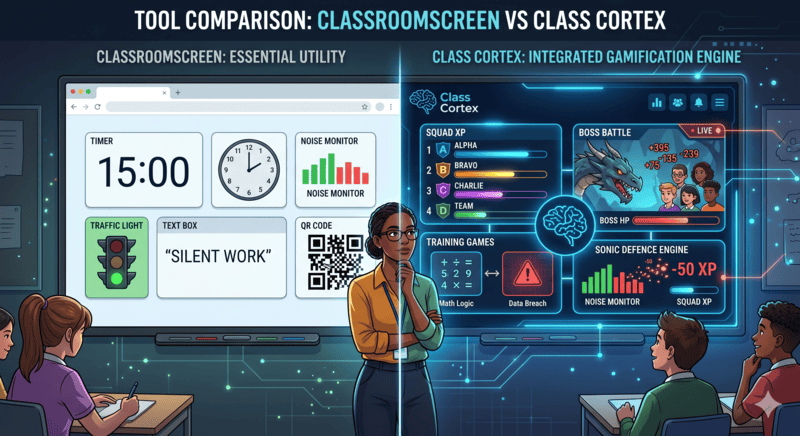
The easiest way to understand the difference is this: Classroomscreen is a set of passive tools. Class Cortex is an active ecosystem.
When you use the noise monitor in Classroomscreen, it turns red when the class is too loud. The teacher still has to notice it, stop the lesson, and enforce a consequence.
When you use the Sonic Defence Engine in Class Cortex, reaching the noise threshold automatically deducts XP from the class scoreboard. The consequence is immediate, automated, and built into a game the students actually care about winning. You don't have to say a word.
Where Classroomscreen Shines
We have to give credit where credit is due. Classroomscreen is fantastic for absolute simplicity. If you need to throw up a quick QR code or a traffic light for a primary school class, and you want to do it in exactly 5 seconds, it is a brilliant tool.
Where Class Cortex Excels
Class Cortex was built for teachers—particularly in upper primary and secondary (Years 5–10)—who need a deeper level of structural engagement. It brings several major features that Classroomscreen simply doesn't offer:
- Live Multiplayer Boss Battles: Students join via their devices to answer questions and deal damage to a boss.
- Persistent XP and Squads: Students and teams have health bars and experience points that carry over week to week.
- Drag-and-Drop Seating Maps: Manage your physical room layout digitally.
- Built-in Training Games: Native mini-games (like mental math and typing speed) that automatically tie into the class XP system.
The Privacy Factor
Both platforms are excellent when it comes to privacy. Neither tool requires student accounts or app downloads. Class Cortex takes it a step further by ensuring that no student data is ever sent to our servers—all class rosters and XP scores live entirely in your browser's local storage.
The Verdict
If you are looking for a simple, blank canvas with some helpful widgets, Classroomscreen remains a great choice.
If you are looking for a true "Mission Control" that gamifies your classroom, automates your behavior management, and keeps older students deeply engaged without requiring them to log into accounts, Class Cortex is the definitive upgrade.
Launch the Class Cortex Dashboard