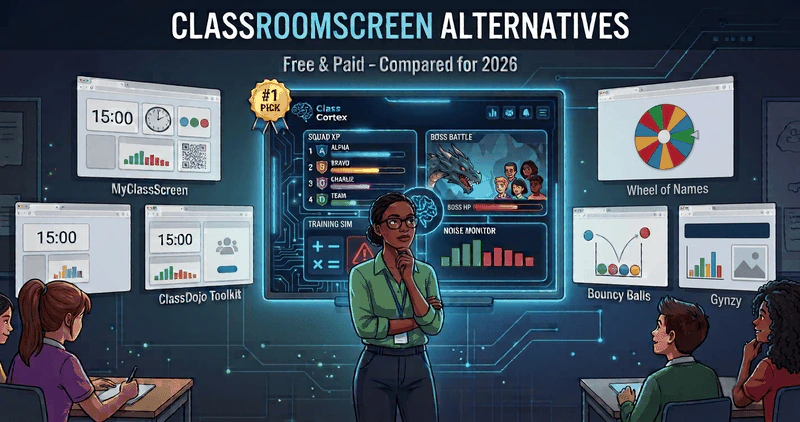
Class Cortex is the top Classroomscreen alternative for teachers who want gamification built in. Other strong options are MyClassScreen for a free like-for-like widget board, ClassDojo Toolkit for primary classes already on ClassDojo, and Gynzy for a full interactive whiteboard.
If you project anything onto a smartboard during your lessons, there is a very high chance you have used Classroomscreen. It pioneered the concept of the "digital widget board" for teachers - timers, noise monitors, random name pickers, QR codes, and traffic lights all in a single browser tab, with zero installation required.
It is still a good tool. Teachers usually go looking for an alternative for one of three reasons: they want something the free Basic plan does not include, such as saving and sharing screens, they want a board that does more than display, or they want a tool that suits their age group or their whole school better. This guide compares six alternatives on what they actually do, what they cost, and who each one suits, with every price checked in October 2026.
What Classroomscreen Does Well (and Where It Stops)
Credit where it is due. Classroomscreen's Basic plan is free forever and includes all 26 widgets - timer, noise meter, name picker, QR codes, traffic light, drawing and more - and you can have a countdown on screen in under five seconds. Pro costs USD $36 a year (around AUD $55) and adds unlimited saved name lists, saved and shared screens, folders, and custom backgrounds. On Basic you are limited to three saved name lists and cannot save a screen to reuse later.
Where it stops is the moment a widget needs to lead to something. The sound level widget turns red when the class is too loud and can ring a bell if the noise stays over the limit for ten seconds. That is where it ends. The teacher still has to pause the lesson and enforce a consequence, and nothing the class does carries over to tomorrow. Most of the alternatives below fill that gap in a different way.
1. Class Cortex: Best Classroomscreen Alternative for Gamification
Class Cortex was built for teachers in upper primary and secondary classrooms - particularly Years 5 through 10 - who need structural engagement beyond a widget display. It shares Classroomscreen's browser-based, no-install approach and covers the same core tools: a countdown timer, noise monitor, random student picker, QR codes and a free online whiteboard. Then it adds an entire layer Classroomscreen has never offered. The free tier covers one class of up to 30 students; Pro is AUD $49 a year.
Persistent XP and Squad System
Every student has individual XP and HP that carries across every lesson, every week. Up to six tactical squads - ALPHA through FOXTROT - compete with their own XP bars visible on the main scoreboard. Set weekly XP goals. Unlock CC-Achieve milestone badges. Students can even spend their own banked XP on avatars through the Neural Core Economy. The gamification layer runs continuously in the background - not just during a single activity.
Live Multiplayer Boss Battles
Students join at classcortex.com/join via QR code on their own devices. No account. No app. You reveal a question, they answer on their phones, and right answers deal damage to the boss on your screen with the class's combined accuracy deciding how hard each hit lands. It is the most engaging ten minutes in any lesson - and it ties directly into the persistent XP system that was running before it started.
Sonic Defence Noise Monitor
Class Cortex's noise monitor goes significantly beyond Classroomscreen's version. Calibrate it to your room's baseline. When noise crosses the threshold, it fires a visual alarm and an audio cue on the free tier. Pro users can enable full Noise Auto-Penalty mode, which also deducts XP from the class scoreboard automatically and operates completely hands-free while you teach. There is also a Quiet Streak tracker that awards bonus XP for every 30 seconds of sustained quiet - students actively compete to keep it going. For a side-by-side of every free option, see our free classroom noise monitor comparison.
Roster-Linked Seating Map
Build your room layout from your class roster and drag students between seats between periods. Export it instantly as a PDF for relief teachers, admin, or evacuation procedures (Pro). Classroomscreen offers a seating template; Class Cortex links the map to your actual roster - our digital seating chart guide covers how teachers use it.
8 Built-in Classroom Mini-Games
No Kahoot tab. No external site. Eight training games run natively inside Class Cortex - DATA_BREACH (typing speed), SECTOR_MATH (mental arithmetic), MAINFRAME_HACK (logic puzzles), CIPHER_PROTOCOL (code-breaking), and four additional Pro modules including Neural Bingo. Six of the eight award class XP automatically when students succeed (Kinetic Pulse and Neural Bingo are awarded manually), feeding back into the scoreboard that was already running.
The Privacy Factor
Classroomscreen, MyClassScreen and Class Cortex all run without student accounts for core use, which keeps them easy to adopt without IT approval.
Class Cortex goes a step further: no student data is ever sent to its servers. All class rosters, XP scores, and session history live entirely in your browser's local storage. Built with COPPA and GDPR principles in mind. No IT approval required at any school.
Where it falls short: Class Cortex is built for Years 5 to 10. If you teach early years and only need a calm display board, its sci-fi theme and XP economy are more than you need, and a simpler board will suit you better.
Classroomscreen Alternatives Compared (October 2026)
Here is how all six alternatives stack up against Classroomscreen itself. Prices are the published prices as of October 2026; USD prices are shown where a tool only publishes in US dollars.
| Tool | Best for | Free plan | Paid plan | Gamification |
|---|---|---|---|---|
| Class Cortex | Years 5-10, engagement and behaviour | 1 class, up to 30 students, all core tools | AUD $49/yr | Persistent XP, squads, Boss Battles |
| Classroomscreen | Quick display widgets | All 26 widgets, 3 saved name lists | USD $36/yr | None |
| MyClassScreen | A free like-for-like swap | Everything, 43 widgets | No paid plan | Scoreboard widget |
| ClassDojo Toolkit | Primary classes on ClassDojo | 8 tools in the ClassDojo app | Free | ClassDojo points |
| Gynzy | A whole-school whiteboard | Free account to try | Licence, price on request | Lesson games |
| Bouncy Balls | Noise meter only | Free, no sign-up | None | None |
| Wheel of Names | Name picker only | Free | None | None |
Other Classroomscreen Alternatives Worth Knowing About
Class Cortex is not the only option, and the right tool genuinely depends on what you need from your board. If gamification is not what you are after, these are the alternatives worth a look, each strong at a different job.
2. MyClassScreen: Best Free Like-for-Like Swap
Price: Free, with no paid plan or trial. Best for: teachers who like how Classroomscreen works and want saving without paying. MyClassScreen is a free browser-based classroom display with 43 widgets, including a countdown timer of up to 99 minutes, a noise meter whose bar changes colour with room volume (sound is processed in the browser and not recorded), a name picker and a scoreboard widget. Neither teachers nor students need an account, and saved boards live in your browser. The trade-off is the same as Classroomscreen: it is a display board, so nothing a class earns carries over between lessons.
3. ClassDojo Toolkit: Best for Primary Classes Already on ClassDojo
Price: Free, as part of ClassDojo. Best for: primary teachers whose school already uses ClassDojo. The Toolkit adds eight classroom tools - Group Maker, Music, Noise Meter, Timer, Today, Random, Directions and Think-Pair-Share - that you can run on your computer or cast from the mobile app. Because it sits inside ClassDojo, it connects to the points and parent messaging your class already uses. The trade-off is that it is built around the ClassDojo ecosystem and a younger audience, which is why many secondary teachers look elsewhere - see our ClassDojo alternatives guide.
4. Gynzy: Best for a Whole-School Interactive Whiteboard
Price: free account to try, then teacher, school or district licences billed annually, with prices on request. Best for: schools that want an interactive whiteboard platform with ready-made lessons, games and classroom tools in one place. Gynzy is a much bigger platform than a widget board, and that is both its strength and its cost: it is usually bought by a school or district rather than an individual teacher, and you will need a quote to know what it costs.
5. Single-Purpose Tools: Bouncy Balls and Wheel of Names
Sometimes you only need one widget done well. Bouncy Balls is a free noise meter with no sign-up - balls bounce higher as the room gets louder, with themes (Plastic, Emoji, Numbers, Bubbles, Eyeballs), a sensitivity control and an optional Beep or Shush alert. Wheel of Names is a free spinning-wheel name picker that is quick to load with a class list. Both are excellent at their one job; the catch is juggling several tabs during a lesson, which is exactly the problem a board solves. For more picker options, see our random student picker comparison.
None of these keep XP, squad standings and behaviour consequences running between lessons the way Class Cortex does, with no student accounts and the noise monitor feeding the same scoreboard. But if your classroom does not need that gamification layer, each is worth considering on its own merits.
Class Cortex vs Classroomscreen: Feature by Feature
| Feature | Class Cortex | Classroomscreen |
|---|---|---|
| Countdown Timer | ✓ | ✓ |
| Noise Monitor | ✓ + Auto XP Penalty (Pro) | ✓ Display + bell |
| Random Student Picker | ✓ | ✓ |
| QR Code Generator | ✓ | ✓ |
| Whiteboard | ✓ Full tactical | ✓ Basic |
| Persistent XP & HP Tracking | ✓ | ✗ |
| Live Multiplayer Boss Battles | ✓ | ✗ |
| Squad Team System | ✓ | ✗ |
| Drag-and-Drop Seating Map | ✓ Roster-linked | Template |
| Built-in Classroom Mini-Games | 8 games | ✗ |
| No Student Accounts Required | ✓ | ✓ |
| No Software Install | ✓ | ✓ |
| Annual Cost (AUD approx.) | Free / $49 | Free / ~$55 |
Which Classroomscreen Alternative Is Right for You?
Stay with Classroomscreen if: you mainly need a clean display board, the free Basic plan covers you, and your classroom management is already solid.
Choose MyClassScreen if: you want the same kind of widget board, completely free, with boards you can save.
Choose ClassDojo Toolkit if: you teach primary and your school already runs ClassDojo for points and parent messaging.
Choose Gynzy if: your school is buying an interactive whiteboard platform with lessons and games for every classroom.
Choose Class Cortex if: You teach Years 5 through 10. You want behaviour management that runs automatically. You are looking for something that keeps older students engaged beyond passive timer displays. You want the utility tools and a gamification engine - all from one tab, all for free. For a full guide on building the gamification system from scratch, see How to Gamify Your Classroom Without Losing Control. If you are coming from ClassCraft specifically, read our ClassCraft alternatives breakdown.
No student accounts. No credit card. No install.
Frequently Asked Questions
What is the best Classroomscreen alternative?
It depends on what you need. Class Cortex is the best Classroomscreen alternative if you want the same utility tools plus a gamification layer, with persistent XP, squads and live Boss Battles. MyClassScreen is the closest free like-for-like widget board, ClassDojo Toolkit suits primary classes already using ClassDojo, and Gynzy suits schools buying a full interactive whiteboard platform.
Is there a free Classroomscreen alternative?
Yes. MyClassScreen is free with no paid plan and no accounts. Class Cortex has a permanent free tier with one class of up to 30 students, the noise monitor, timer, picker, seating map, whiteboard and XP tracking. ClassDojo Toolkit is free inside the ClassDojo app, and Bouncy Balls (noise meter) and Wheel of Names (name picker) are free single-purpose tools.
How much does Classroomscreen Pro cost?
Classroomscreen Pro is USD $3 per month, billed annually at USD $36 per year, which is around AUD $55. The Basic plan is free forever and includes all 26 widgets, but it is limited to three saved name lists and cannot save or share screens. School and district licences are priced by the number of licences.
Is Class Cortex free like Classroomscreen?
Yes. Class Cortex has a permanent free tier that includes 1 class slot with up to 30 students, full XP and HP tracking, Boss Battles with 2 boss types, 4 training games, noise monitor, seating map, whiteboard, and student picker. The Pro plan is AUD $49 per year and unlocks 12 class slots, unlimited students, 27 themes, Noise Auto-Penalty, 4 Pro boss types, 4 additional training games, Picture-in-Picture mode, and PDF export.
Does Class Cortex have a noise monitor like Classroomscreen?
Yes - and it goes further. On the free tier, Class Cortex's Sonic Defence Engine fires a visual alarm, audio cue, and Quiet Streak XP when noise exceeds your calibrated threshold, rather than just turning red on screen. Pro users unlock Noise Auto-Penalty mode: XP deducts from the class scoreboard automatically for completely hands-free operation. There is also a Quiet Streak tracker that awards bonus XP for sustained silence.
Does Class Cortex require student accounts or app downloads?
No. Class Cortex requires zero student accounts or app downloads. For Boss Battles, students join at classcortex.com/join using a QR code - no email, no password, no registration needed. All class data stays in the teacher's browser local storage. Built with COPPA and GDPR principles in mind. No IT approval required.
Can I use Class Cortex on a smartboard like Classroomscreen?
Yes. Class Cortex runs entirely in Chrome on any computer connected to a smartboard or projector. Nothing to install, no hardware requirements, no configuration. Open classcortex.com/app and you are ready to go before the bell rings. For older or underpowered interactive panels and classroom smart TVs, an optional Performance Mode (Settings > Themes) turns off background blur and a couple of decorative animations, so it stays smooth even on hardware that struggles with heavier web apps.
What are other alternatives to Classroomscreen besides Class Cortex?
Besides Class Cortex, other Classroomscreen alternatives include MyClassScreen for a free widget board with no paid plan, ClassDojo Toolkit for primary classes already using ClassDojo, and Gynzy for a whole-school interactive whiteboard with lessons and games. Class Cortex is the only one of these that keeps XP, squads and behaviour consequences running across every lesson, with no student accounts.
Further Reading